Use Markdown in Blogger Posts with HTML Editor 查看相关主题: blogger ApproachPreviously in the URL Shorten Worker for a Markdown Journal solution, the page content contained markdown-formatted text, with a simple JS snippet attached outside to convert markdown to HTML.</div><div class="separator" style="clear: both; text-align: center;"><a href="https://blogger.googleusercontent.com/img/a/AVvXsEgD-MaoygAKod-9ZrIpRgVf9n6mnZj182wq_xrEhUATFTxbYc-iD2jPs-EM2ARXkvSgAwfak2nYGVtEGB5yvb5FkzCOF_rCzC91qJ_6FVvzfGI5TdElBtVSEr9tOURl1DIKaGOB9HnwNGxPDhZ1CK8gO_F7vekDChf5Qip1IM8-6JoI9HtWWSHSoOINy4M" style="margin-left: 1em; margin-right: 1em;"><img alt="" data-original-height="332" data-original-width="727" src="https://blogger.googleusercontent.com/img/a/AVvXsEgD-MaoygAKod-9ZrIpRgVf9n6mnZj182wq_xrEhUATFTxbYc-iD2jPs-EM2ARXkvSgAwfak2nYGVtEGB5yvb5FkzCOF_rCzC91qJ_6FVvzfGI5TdElBtVSEr9tOURl1DIKaGOB9HnwNGxPDhZ1CK8gO_F7vekDChf5Qip1IM8-6JoI9HtWWSHSoOINy4M=s16000" /></a></div><span><a name='more'></a></span><div class="separator" style="clear: both; text-align: left;"><br /></div><br /><h3 style="text-align: left;">Practice</h3><div class="separator" style="clear: both; text-align: left;">When creating a new post in Blogger, switch to the HTML view.</div><div class="separator" style="clear: both; text-align: center;"><a href="https://blogger.googleusercontent.com/img/a/AVvXsEiBpcg06OVIVQ3qxfKw6SB1YEfyF7zoJH0oLD-ddks8eMRB_MT4nlaqVR8t_fgVDChGWde0EfIXbUa7EVE9VsLXY5khhtIxValSrO1rBRrR9taRyPtcWIZ7MD-kc86Ulj-aZyvpYy1ZnbUM3YAiKCk7VKEol98ooLhtsSbq75l7_O-UxLdZM_lSEvTZH4o" style="margin-left: 1em; margin-right: 1em;"><img alt="" data-original-height="489" data-original-width="275" src="https://blogger.googleusercontent.com/img/a/AVvXsEiBpcg06OVIVQ3qxfKw6SB1YEfyF7zoJH0oLD-ddks8eMRB_MT4nlaqVR8t_fgVDChGWde0EfIXbUa7EVE9VsLXY5khhtIxValSrO1rBRrR9taRyPtcWIZ7MD-kc86Ulj-aZyvpYy1ZnbUM3YAiKCk7VKEol98ooLhtsSbq75l7_O-UxLdZM_lSEvTZH4o=s16000" /></a></div><br /><div class="separator" style="clear: both; text-align: left;">Paste the markdown text in. For example,</div><blockquote></blockquote><div class="separator" style="clear: both;">- 演示视频 </div><div class="separator" style="clear: both;">https://www.youtube.com/watch?v=DZcXqyIm_R0</div><div class="separator" style="clear: both;"><br /></div><div class="separator" style="clear: both;">- 演示站 </div><div class="separator" style="clear: both;">https://journal.crazypeace.workers.dev/journaljournal</div><div class="separator" style="clear: both;"><br /></div><div class="separator" style="clear: both;">- Github </div><div class="separator" style="clear: both;">https://github.com/crazypeace/url-Shorten-Worker/</div><div class="separator" style="clear: both;"><br /></div><div class="separator" style="clear: both;">- 搭建过程 </div><div class="separator" style="clear: both;">https://www.nodeseek.com/post-58723-1</div><div class="separator" style="clear: both;"><br /></div><div class="separator" style="clear: both;">最后把这几行改一下就行. 第3行定义了操作页面. 第7行定义了保存key-value时,是否检验已经存在key. 第11行定义了一些系统的行为.</div><div class="separator" style="clear: both;"><br /></div><div class="separator" style="clear: both;">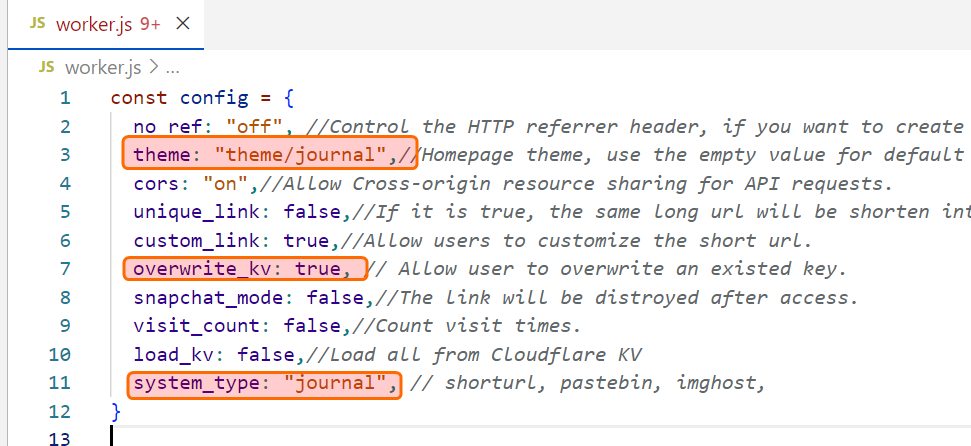</div><div class="separator" style="clear: both;"><br /></div><div class="separator" style="clear: both;">对了, Markdown 要用到图床, 可以用这个 https://www.nodeseek.com/post-60815-1</div><div style="text-align: left;">Publish it as a formal post. </div><div style="text-align: left;"><br /></div><div style="text-align: left;">Then check the source of this page and find that the HTML part of the body has a class of <span style="background-color: #ea9999;">post-body</span> entry-content</div><blockquote>class='post-body entry-content' </blockquote><div class="separator" style="clear: both; text-align: center;"><a href="https://blogger.googleusercontent.com/img/a/AVvXsEjStzOHiaeg1e8bQdN3abYrncZG50dtdPZhv1pPzpI9A8GyVo0HNCInaT5Qzpw8PoJODVqfAksdsGWe8bSeYYkabLcdS6ZNoETmtG8l-4nC3O5B--MFPlW54lg0U12gQRBjETd5nfydQsndHWNfXqAnqkkRP-W03_Qq2sXzN1RbNm-WT3_HfCQMnT9ofHM" style="margin-left: 1em; margin-right: 1em;"><img alt="" data-original-height="449" data-original-width="1202" src="https://blogger.googleusercontent.com/img/a/AVvXsEjStzOHiaeg1e8bQdN3abYrncZG50dtdPZhv1pPzpI9A8GyVo0HNCInaT5Qzpw8PoJODVqfAksdsGWe8bSeYYkabLcdS6ZNoETmtG8l-4nC3O5B--MFPlW54lg0U12gQRBjETd5nfydQsndHWNfXqAnqkkRP-W03_Qq2sXzN1RbNm-WT3_HfCQMnT9ofHM=s16000" /></a></div><br /><div style="text-align: left;">In Blogger, go to Theme - Edit HTML </div><div class="separator" style="clear: both; text-align: center;"><a href="https://blogger.googleusercontent.com/img/a/AVvXsEhf_P0lOWZIEHFyWNJYKEeHa1QSXpGMHrK7HBAGEDYQjIvtze2V411uWAXKFV5iH2fekZPTJ1zJkmB02VWC0um4ZElK9aTKpfDHOP2yPHhx7II2U7a9iaJGmRXAoqGblvxv5K7-DbHpzHsFro4GsHIgCjoNzt6QFtau0jhjqrQ-X3XkDbXNA7w4heiSwXE" style="margin-left: 1em; margin-right: 1em;"><img alt="" data-original-height="1138" data-original-width="1207" src="https://blogger.googleusercontent.com/img/a/AVvXsEhf_P0lOWZIEHFyWNJYKEeHa1QSXpGMHrK7HBAGEDYQjIvtze2V411uWAXKFV5iH2fekZPTJ1zJkmB02VWC0um4ZElK9aTKpfDHOP2yPHhx7II2U7a9iaJGmRXAoqGblvxv5K7-DbHpzHsFro4GsHIgCjoNzt6QFtau0jhjqrQ-X3XkDbXNA7w4heiSwXE=s16000" /></a></div><br />Add the following JS content.<blockquote></blockquote><div style="text-align: left;"><script src="https://cdn.jsdelivr.net/npm/marked/marked.min.js"></script></div><div><br /></div><div><script></div><div>document.addEventListener('DOMContentLoaded', function() {</div><div> // 获取所有具有 "post-body" 类的元素的第1个, 也就是博文的正文</div><div> const blogContent = document.getElementsByClassName("post-body")[0];</div><div> // 获得markdown文本</div><div> const markdownContent = blogContent.textContent;</div><div> // 转换为html再放到博文正文内容</div><div> blogContent.innerHTML = marked.parse(markdownContent);</div><div>}); </div><div></script></div><div class="separator" style="clear: both; text-align: center;"><a href="https://blogger.googleusercontent.com/img/a/AVvXsEi-vRqi13KVtfVWIzMQm0kcMSXptWCC79f_eL6OZ8K-l50dN0ZrPBPA3EBqUdONxlDXTpgOZ48RAiWjTODwUXSi_-LlEPl4lnTv34vTC255n5ywh9ihNFIaaKCdib_XVa2wQeMFM2aEkqis5kqjRY3aoLvxLtZRRAly5dt8z80nMiv6mktI2wAhNQn4L2A" style="margin-left: 1em; margin-right: 1em;"><img alt="" data-original-height="407" data-original-width="873" src="https://blogger.googleusercontent.com/img/a/AVvXsEi-vRqi13KVtfVWIzMQm0kcMSXptWCC79f_eL6OZ8K-l50dN0ZrPBPA3EBqUdONxlDXTpgOZ48RAiWjTODwUXSi_-LlEPl4lnTv34vTC255n5ywh9ihNFIaaKCdib_XVa2wQeMFM2aEkqis5kqjRY3aoLvxLtZRRAly5dt8z80nMiv6mktI2wAhNQn4L2A=s16000" /></a></div><div><br /></div>Save<div class="separator" style="clear: both; text-align: center;"><a href="https://blogger.googleusercontent.com/img/a/AVvXsEi0Le8X-zqP8u12oz0GrOHu4WMCgRtszXkX8McZAeCxGB6rdzKMu85qaBWs-2hLoKiEMrY82UA5B47SC3em-LzqhgeFw289uWwW34gJAlum-Ix1tbwiolWRQV074J7JhYyoTXIqy4gpnTn_AHwnKk7X6PdKpzAb0dGYLHiqJUYqR5-3iJ-SV9jGC9JvP9A" style="margin-left: 1em; margin-right: 1em;"><img alt="" data-original-height="478" data-original-width="596" src="https://blogger.googleusercontent.com/img/a/AVvXsEi0Le8X-zqP8u12oz0GrOHu4WMCgRtszXkX8McZAeCxGB6rdzKMu85qaBWs-2hLoKiEMrY82UA5B47SC3em-LzqhgeFw289uWwW34gJAlum-Ix1tbwiolWRQV074J7JhYyoTXIqy4gpnTn_AHwnKk7X6PdKpzAb0dGYLHiqJUYqR5-3iJ-SV9jGC9JvP9A=s16000" /></a></div><div><br /></div><div>========</div><h3 style="text-align: left;">Done</h3><div><br /></div><div>Put it on Github</div><div><a href="https://github.com/crazypeace/blogger-replace-markdown-text-html">https://github.com/crazypeace/blogger-replace-markdown-text-html</a></div><div><br /></div><div>You can use it like this</div><blockquote></blockquote><div><script src="https://cdn.jsdelivr.net/npm/marked/marked.min.js" /></div><div><script src="https://crazypeace.github.io/blogger-replace-markdown-text-html/blogger-replace-markdown-text-html.js" /></div><div class="separator" style="clear: both; text-align: center;"><a href="https://blogger.googleusercontent.com/img/b/R29vZ2xl/AVvXsEhnA1z5I7564VdAwqNozrVelQAmQRKUVEpP9vGztHozN-uWTIPDi3uq0vO3_F8Tpa87l6efNgRyVf92B8nOe689YEO0sr-NOKKz2sfTHHFEs8cqkawBGPParOyDnyNnap-0HWIA8PZe8_gOLYpflnnLTBkYwVIBjLYRQ9-2W8SwII8jzeVmleN2yBekCTQ/s1279/chrome_2024-10-02_10-23-31.png" imageanchor="1" style="margin-left: 1em; margin-right: 1em;"><img border="0" data-original-height="175" data-original-width="1279" src="https://blogger.googleusercontent.com/img/b/R29vZ2xl/AVvXsEhnA1z5I7564VdAwqNozrVelQAmQRKUVEpP9vGztHozN-uWTIPDi3uq0vO3_F8Tpa87l6efNgRyVf92B8nOe689YEO0sr-NOKKz2sfTHHFEs8cqkawBGPParOyDnyNnap-0HWIA8PZe8_gOLYpflnnLTBkYwVIBjLYRQ9-2W8SwII8jzeVmleN2yBekCTQ/s16000/chrome_2024-10-02_10-23-31.png" /></a></div><br /><p>========</p><h3 style="text-align: left;">Postscript</h3><p>My blog is not pure markdown content; I still want to stick with my original way of using it.</p><p>So I created a demo site</p><p><a href="https://use-markdown-in.blogspot.com/2024/10/markdown-demo.html">https://use-markdown-in.blogspot.com/2024/10/markdown-demo.html</a></p><div class="separator" style="clear: both; text-align: center;"><iframe allowfullscreen="" class="BLOG_video_class" height="266" src="https://www.youtube.com/embed/UjhAkpdcQ4o" width="320" youtube-src-id="UjhAkpdcQ4o"></iframe></div><br /><p><br /></p> </div> <div class='post-footer'> <div class='post-footer-line post-footer-line-1'> <span class='byline post-timestamp'> <meta content='https://icdyct.blogspot.com/2024/10/use-markdown-in-blogger-posts-with-html.html'/> <a class='timestamp-link' href='https://icdyct.blogspot.com/2024/10/use-markdown-in-blogger-posts-with-html.html' rel='bookmark' title='permanent link'> <time class='published' datetime='2024-10-01T19:13:00-07:00' title='2024-10-01T19:13:00-07:00'> October 01, 2024 </time> </a> </span> </div> <div class='post-footer-line post-footer-line-2'> </div> </div> </div> </div> <section class='comments embed' data-num-comments='0' id='comments'> <a name='comments'></a> <div class='comments-title'>Comments</div> <div id='Blog1_comments-block-wrapper'> </div> <div class='footer'> <div class='comment-form'> <a name='comment-form'></a> <div id='comment-post-message'>Post a Comment</div> <a href='https://www.blogger.com/comment/frame/4362187242651091443?po=6853097334180381758&hl=en&saa=85391&origin=https://icdyct.blogspot.com' id='comment-editor-src'></a> <iframe allowtransparency='allowtransparency' class='blogger-iframe-colorize blogger-comment-from-post' frameborder='0' height='410px' id='comment-editor' name='comment-editor' src='' width='100%'></iframe> <script src='https://www.blogger.com/static/v1/jsbin/3790099508-comment_from_post_iframe.js' type='text/javascript'></script> <script type='text/javascript'> BLOG_CMT_createIframe('https://www.blogger.com/rpc_relay.html'); </script> </div> </div> </section> </article> </div> </div> </div> <div class='section' id='sidebar_bottom' name='Sidebar (Bottom)'><div class='widget Translate' data-version='2' id='Translate1'> <div class='title'>Translate 翻译</div> <div id='google_translate_element'></div> <script> function googleTranslateElementInit() { new google.translate.TranslateElement({ pageLanguage: 'en', autoDisplay: 'true', layout: google.translate.TranslateElement.InlineLayout.VERTICAL }, 'google_translate_element'); } </script> <script src='//translate.google.com/translate_a/element.js?cb=googleTranslateElementInit'></script> </div><div class='widget Subscribe' data-version='2' id='Subscribe1'> <div class='title'>订阅小工具</div> <div class='widget-content'> <div class='subscribe-wrapper subscribe-type-POST'> <div class='subscribe expanded subscribe-type-POST' id='SW_READER_LIST_Subscribe1POST' style='display:none;'> <div class='top'> <span class='inner' onclick='return(_SW_toggleReaderList(event, "Subscribe1POST"));'> <img class='subscribe-dropdown-arrow' src='https://resources.blogblog.com/img/widgets/arrow_dropdown.gif'/> <img align='absmiddle' alt='' border='0' class='feed-icon' src='https://resources.blogblog.com/img/icon_feed12.png'/> Posts </span> <div class='feed-reader-links'> <a class='feed-reader-link' href='https://www.netvibes.com/subscribe.php?url=https%3A%2F%2Ficdyct.blogspot.com%2Ffeeds%2Fposts%2Fdefault' target='_blank'> <img src='https://resources.blogblog.com/img/widgets/subscribe-netvibes.png'/> </a> <a class='feed-reader-link' href='https://add.my.yahoo.com/content?url=https%3A%2F%2Ficdyct.blogspot.com%2Ffeeds%2Fposts%2Fdefault' target='_blank'> <img src='https://resources.blogblog.com/img/widgets/subscribe-yahoo.png'/> </a> <a class='feed-reader-link' href='https://icdyct.blogspot.com/feeds/posts/default' target='_blank'> <img align='absmiddle' class='feed-icon' src='https://resources.blogblog.com/img/icon_feed12.png'/> Atom </a> </div> </div> <div class='bottom'></div> </div> <div class='subscribe' id='SW_READER_LIST_CLOSED_Subscribe1POST' onclick='return(_SW_toggleReaderList(event, "Subscribe1POST"));'> <div class='top'> <span class='inner'> <img class='subscribe-dropdown-arrow' src='https://resources.blogblog.com/img/widgets/arrow_dropdown.gif'/> <span onclick='return(_SW_toggleReaderList(event, "Subscribe1POST"));'> <img align='absmiddle' alt='' border='0' class='feed-icon' src='https://resources.blogblog.com/img/icon_feed12.png'/> Posts </span> </span> </div> <div class='bottom'></div> </div> </div> <div class='subscribe-wrapper subscribe-type-PER_POST'> <div class='subscribe expanded subscribe-type-PER_POST' id='SW_READER_LIST_Subscribe1PER_POST' style='display:none;'> <div class='top'> <span class='inner' onclick='return(_SW_toggleReaderList(event, "Subscribe1PER_POST"));'> <img class='subscribe-dropdown-arrow' src='https://resources.blogblog.com/img/widgets/arrow_dropdown.gif'/> <img align='absmiddle' alt='' border='0' class='feed-icon' src='https://resources.blogblog.com/img/icon_feed12.png'/> Comments </span> <div class='feed-reader-links'> <a class='feed-reader-link' href='https://www.netvibes.com/subscribe.php?url=https%3A%2F%2Ficdyct.blogspot.com%2Ffeeds%2F6853097334180381758%2Fcomments%2Fdefault' target='_blank'> <img src='https://resources.blogblog.com/img/widgets/subscribe-netvibes.png'/> </a> <a class='feed-reader-link' href='https://add.my.yahoo.com/content?url=https%3A%2F%2Ficdyct.blogspot.com%2Ffeeds%2F6853097334180381758%2Fcomments%2Fdefault' target='_blank'> <img src='https://resources.blogblog.com/img/widgets/subscribe-yahoo.png'/> </a> <a class='feed-reader-link' href='https://icdyct.blogspot.com/feeds/6853097334180381758/comments/default' target='_blank'> <img align='absmiddle' class='feed-icon' src='https://resources.blogblog.com/img/icon_feed12.png'/> Atom </a> </div> </div> <div class='bottom'></div> </div> <div class='subscribe' id='SW_READER_LIST_CLOSED_Subscribe1PER_POST' onclick='return(_SW_toggleReaderList(event, "Subscribe1PER_POST"));'> <div class='top'> <span class='inner'> <img class='subscribe-dropdown-arrow' src='https://resources.blogblog.com/img/widgets/arrow_dropdown.gif'/> <span onclick='return(_SW_toggleReaderList(event, "Subscribe1PER_POST"));'> <img align='absmiddle' alt='' border='0' class='feed-icon' src='https://resources.blogblog.com/img/icon_feed12.png'/> Comments </span> </span> </div> <div class='bottom'></div> </div> </div> <div style='clear:both'></div> </div> </div><div class='widget Label' data-version='2' id='Label1'> <div class='title'>标签</div> <div class='widget-content cloud-label-widget-content'> <span class='label-size label-size-5'><a class='label-name' href='https://icdyct.blogspot.com/search/label/Telegram'>Telegram<span class='label-count'>94</span></a></span> <span class='label-size label-size-5'><a class='label-name' href='https://icdyct.blogspot.com/search/label/GPT%E5%BC%80%E5%8F%91'>GPT开发<span class='label-count'>68</span></a></span> <span class='label-size label-size-5'><a class='label-name' href='https://icdyct.blogspot.com/search/label/Agent%E5%BC%80%E5%8F%91'>Agent开发<span class='label-count'>62</span></a></span> <span class='label-size label-size-5'><a class='label-name' href='https://icdyct.blogspot.com/search/label/worker'>worker<span class='label-count'>60</span></a></span> <span class='label-size label-size-4'><a class='label-name' href='https://icdyct.blogspot.com/search/label/blogger'>blogger<span class='label-count'>50</span></a></span> <span class='label-size label-size-4'><a class='label-name' href='https://icdyct.blogspot.com/search/label/Url-Shorten-Worker'>Url-Shorten-Worker<span class='label-count'>42</span></a></span> <span class='label-size label-size-4'><a class='label-name' href='https://icdyct.blogspot.com/search/label/%E5%BC%80%E5%8F%91'>开发<span class='label-count'>40</span></a></span> <span class='label-size label-size-4'><a class='label-name' href='https://icdyct.blogspot.com/search/label/antispam'>antispam<span class='label-count'>28</span></a></span> <span class='label-size label-size-4'><a class='label-name' href='https://icdyct.blogspot.com/search/label/%E6%A1%88%E4%BE%8B'>案例<span class='label-count'>22</span></a></span> <span class='label-size label-size-3'><a class='label-name' href='https://icdyct.blogspot.com/search/label/CloudFlare'>CloudFlare<span class='label-count'>14</span></a></span> <span class='label-size label-size-3'><a class='label-name' href='https://icdyct.blogspot.com/search/label/%E6%B2%B9%E7%8C%B4'>油猴<span class='label-count'>12</span></a></span> <span class='label-size label-size-3'><a class='label-name' href='https://icdyct.blogspot.com/search/label/Agent%E5%BA%94%E7%94%A8'>Agent应用<span class='label-count'>8</span></a></span> <span class='label-size label-size-3'><a class='label-name' href='https://icdyct.blogspot.com/search/label/Hermes'>Hermes<span class='label-count'>8</span></a></span> <span class='label-size label-size-3'><a class='label-name' href='https://icdyct.blogspot.com/search/label/%E7%BC%96%E8%AF%91'>编译<span class='label-count'>8</span></a></span> <span class='label-size label-size-2'><a class='label-name' href='https://icdyct.blogspot.com/search/label/cliproxyapi'>cliproxyapi<span class='label-count'>6</span></a></span> <span class='label-size label-size-2'><a class='label-name' href='https://icdyct.blogspot.com/search/label/hack'>hack<span class='label-count'>6</span></a></span> <span class='label-size label-size-2'><a class='label-name' href='https://icdyct.blogspot.com/search/label/tg-keyword-monitor-bot'>tg-keyword-monitor-bot<span class='label-count'>6</span></a></span> <span class='label-size label-size-2'><a class='label-name' href='https://icdyct.blogspot.com/search/label/css'>css<span class='label-count'>4</span></a></span> <span class='label-size label-size-2'><a class='label-name' href='https://icdyct.blogspot.com/search/label/fake-curl-wget-sh'>fake-curl-wget-sh<span class='label-count'>4</span></a></span> <span class='label-size label-size-2'><a class='label-name' href='https://icdyct.blogspot.com/search/label/tg-keyword-react-bot'>tg-keyword-react-bot<span class='label-count'>4</span></a></span> <span class='label-size label-size-2'><a class='label-name' href='https://icdyct.blogspot.com/search/label/%E5%AF%86%E7%A0%81'>密码<span class='label-count'>4</span></a></span> <span class='label-size label-size-1'><a class='label-name' href='https://icdyct.blogspot.com/search/label/AutoHotKey'>AutoHotKey<span class='label-count'>2</span></a></span> <span class='label-size label-size-1'><a class='label-name' href='https://icdyct.blogspot.com/search/label/file-r2-worker'>file-r2-worker<span class='label-count'>2</span></a></span> <span class='label-size label-size-1'><a class='label-name' href='https://icdyct.blogspot.com/search/label/ghproxy'>ghproxy<span class='label-count'>2</span></a></span> <span class='label-size label-size-1'><a class='label-name' href='https://icdyct.blogspot.com/search/label/openclaw'>openclaw<span class='label-count'>2</span></a></span> <span class='label-size label-size-1'><a class='label-name' href='https://icdyct.blogspot.com/search/label/%E7%BD%91%E7%AB%99'>网站<span class='label-count'>2</span></a></span> <span class='label-size label-size-1'><a class='label-name' href='https://icdyct.blogspot.com/search/label/%E9%9A%8F%E6%83%B3'>随想<span class='label-count'>2</span></a></span> </div> </div><div class='widget BlogArchive' data-version='2' id='BlogArchive1'> <div class='title'>Blog Archive</div> <div class='widget-content'> <div id='ArchiveList'> <div id='BlogArchive1_ArchiveList'> <ul class='hierarchy'> <li class='archivedate'> <div class='hierarchy-title'> <a class='post-count-link' href='https://icdyct.blogspot.com/2026/'> 2026 <span class='post-count'>110</span> </a> </div> <div class='hierarchy-content'> <ul class='hierarchy'> <li class='archivedate'> <div class='hierarchy-title'> <a class='post-count-link' href='https://icdyct.blogspot.com/2026/09/'> Sep 2026 <span class='post-count'>14</span> </a> </div> <div class='hierarchy-content'> </div> </li> <li class='archivedate'> <div class='hierarchy-title'> <a class='post-count-link' href='https://icdyct.blogspot.com/2026/08/'> Aug 2026 <span class='post-count'>26</span> </a> </div> <div class='hierarchy-content'> </div> </li> <li class='archivedate'> <div class='hierarchy-title'> <a class='post-count-link' href='https://icdyct.blogspot.com/2026/07/'> Jul 2026 <span class='post-count'>18</span> </a> </div> <div class='hierarchy-content'> </div> </li> <li class='archivedate'> <div class='hierarchy-title'> <a class='post-count-link' href='https://icdyct.blogspot.com/2026/06/'> Jun 2026 <span class='post-count'>20</span> </a> </div> <div class='hierarchy-content'> </div> </li> <li class='archivedate'> <div class='hierarchy-title'> <a class='post-count-link' href='https://icdyct.blogspot.com/2026/05/'> May 2026 <span class='post-count'>12</span> </a> </div> <div class='hierarchy-content'> </div> </li> <li class='archivedate'> <div class='hierarchy-title'> <a class='post-count-link' href='https://icdyct.blogspot.com/2026/04/'> Apr 2026 <span class='post-count'>8</span> </a> </div> <div class='hierarchy-content'> </div> </li> <li class='archivedate'> <div class='hierarchy-title'> <a class='post-count-link' href='https://icdyct.blogspot.com/2026/02/'> Feb 2026 <span class='post-count'>2</span> </a> </div> <div class='hierarchy-content'> </div> </li> <li class='archivedate'> <div class='hierarchy-title'> <a class='post-count-link' href='https://icdyct.blogspot.com/2026/01/'> Jan 2026 <span class='post-count'>10</span> </a> </div> <div class='hierarchy-content'> </div> </li> </ul> </div> </li> <li class='archivedate'> <div class='hierarchy-title'> <a class='post-count-link' href='https://icdyct.blogspot.com/2025/'> 2025 <span class='post-count'>70</span> </a> </div> <div class='hierarchy-content'> <ul class='hierarchy'> <li class='archivedate'> <div class='hierarchy-title'> <a class='post-count-link' href='https://icdyct.blogspot.com/2025/12/'> Dec 2025 <span class='post-count'>6</span> </a> </div> <div class='hierarchy-content'> </div> </li> <li class='archivedate'> <div class='hierarchy-title'> <a class='post-count-link' href='https://icdyct.blogspot.com/2025/11/'> Nov 2025 <span class='post-count'>26</span> </a> </div> <div class='hierarchy-content'> </div> </li> <li class='archivedate'> <div class='hierarchy-title'> <a class='post-count-link' href='https://icdyct.blogspot.com/2025/10/'> Oct 2025 <span class='post-count'>26</span> </a> </div> <div class='hierarchy-content'> </div> </li> <li class='archivedate'> <div class='hierarchy-title'> <a class='post-count-link' href='https://icdyct.blogspot.com/2025/09/'> Sep 2025 <span class='post-count'>12</span> </a> </div> <div class='hierarchy-content'> </div> </li> </ul> </div> </li> <li class='archivedate'> <div class='hierarchy-title'> <a class='post-count-link' href='https://icdyct.blogspot.com/2024/'> 2024 <span class='post-count'>41</span> </a> </div> <div class='hierarchy-content'> <ul class='hierarchy'> <li class='archivedate'> <div class='hierarchy-title'> <a class='post-count-link' href='https://icdyct.blogspot.com/2024/12/'> Dec 2024 <span class='post-count'>1</span> </a> </div> <div class='hierarchy-content'> </div> </li> <li class='archivedate'> <div class='hierarchy-title'> <a class='post-count-link' href='https://icdyct.blogspot.com/2024/11/'> Nov 2024 <span class='post-count'>2</span> </a> </div> <div class='hierarchy-content'> </div> </li> <li class='archivedate'> <div class='hierarchy-title'> <a class='post-count-link' href='https://icdyct.blogspot.com/2024/10/'> Oct 2024 <span class='post-count'>2</span> </a> </div> <div class='hierarchy-content'> <ul class='posts hierarchy'> <li> <a href='https://icdyct.blogspot.com/2024/10/use-markdown-in-blogger-posts-with-html.html'>Use Markdown in Blogger Posts with HTML Editor</a> </li> <li> <a href='https://icdyct.blogspot.com/2024/10/bloggerblogspot-markdown.html'>在 Blogger/blogspot 的内容中使用 markdown</a> </li> </ul> </div> </li> <li class='archivedate'> <div class='hierarchy-title'> <a class='post-count-link' href='https://icdyct.blogspot.com/2024/07/'> Jul 2024 <span class='post-count'>2</span> </a> </div> <div class='hierarchy-content'> </div> </li> <li class='archivedate'> <div class='hierarchy-title'> <a class='post-count-link' href='https://icdyct.blogspot.com/2024/06/'> Jun 2024 <span class='post-count'>6</span> </a> </div> <div class='hierarchy-content'> </div> </li> <li class='archivedate'> <div class='hierarchy-title'> <a class='post-count-link' href='https://icdyct.blogspot.com/2024/05/'> May 2024 <span class='post-count'>2</span> </a> </div> <div class='hierarchy-content'> </div> </li> <li class='archivedate'> <div class='hierarchy-title'> <a class='post-count-link' href='https://icdyct.blogspot.com/2024/04/'> Apr 2024 <span class='post-count'>6</span> </a> </div> <div class='hierarchy-content'> </div> </li> <li class='archivedate'> <div class='hierarchy-title'> <a class='post-count-link' href='https://icdyct.blogspot.com/2024/02/'> Feb 2024 <span class='post-count'>4</span> </a> </div> <div class='hierarchy-content'> </div> </li> <li class='archivedate'> <div class='hierarchy-title'> <a class='post-count-link' href='https://icdyct.blogspot.com/2024/01/'> Jan 2024 <span class='post-count'>16</span> </a> </div> <div class='hierarchy-content'> </div> </li> </ul> </div> </li> <li class='archivedate'> <div class='hierarchy-title'> <a class='post-count-link' href='https://icdyct.blogspot.com/2023/'> 2023 <span class='post-count'>12</span> </a> </div> <div class='hierarchy-content'> <ul class='hierarchy'> <li class='archivedate'> <div class='hierarchy-title'> <a class='post-count-link' href='https://icdyct.blogspot.com/2023/11/'> Nov 2023 <span class='post-count'>6</span> </a> </div> <div class='hierarchy-content'> </div> </li> <li class='archivedate'> <div class='hierarchy-title'> <a class='post-count-link' href='https://icdyct.blogspot.com/2023/06/'> Jun 2023 <span class='post-count'>2</span> </a> </div> <div class='hierarchy-content'> </div> </li> <li class='archivedate'> <div class='hierarchy-title'> <a class='post-count-link' href='https://icdyct.blogspot.com/2023/03/'> Mar 2023 <span class='post-count'>2</span> </a> </div> <div class='hierarchy-content'> </div> </li> <li class='archivedate'> <div class='hierarchy-title'> <a class='post-count-link' href='https://icdyct.blogspot.com/2023/01/'> Jan 2023 <span class='post-count'>2</span> </a> </div> <div class='hierarchy-content'> </div> </li> </ul> </div> </li> <li class='archivedate'> <div class='hierarchy-title'> <a class='post-count-link' href='https://icdyct.blogspot.com/2022/'> 2022 <span class='post-count'>6</span> </a> </div> <div class='hierarchy-content'> <ul class='hierarchy'> <li class='archivedate'> <div class='hierarchy-title'> <a class='post-count-link' href='https://icdyct.blogspot.com/2022/08/'> Aug 2022 <span class='post-count'>6</span> </a> </div> <div class='hierarchy-content'> </div> </li> </ul> </div> </li> </ul> </div> </div> </div> </div> <div class='widget BloggerButton' data-version='2' id='BloggerButton1'> <div class='widget-content'> <a href='https://www.blogger.com' rel='nofollow'> <img alt='Powered by Blogger' src='https://resources.blogblog.com/html/buttons/blogger-powerby-blue.gif' srcset='' width='128'/> </a> </div> </div> </div> </main> <footer> <div class='footer section' id='footer'><div class='widget Attribution' data-version='2' id='Attribution1'> <div class='widget-content'> <div class='blogger'> <a href='https://www.blogger.com' rel='nofollow'> <svg class='svg-icon-24'> <use xlink:href='/responsive/sprite_v1_6.css.svg#ic_post_blogger_black_24dp' xmlns:xlink='http://www.w3.org/1999/xlink'></use> </svg> Powered by Blogger </a> </div> <div class='copyright'><a href="https://icdyct.blogspot.com/p/icdyct.html">联系我 FollowMe</a></div> </div> </div> </div> </footer> <!-- 为所有 pre 添加 class='prettyprint'; 手动颜色由 b:skin 中 CSS 保护 --> <script type='text/javascript'> //<![CDATA[ (function(){ function run(){ document.querySelectorAll('pre').forEach(function(el){el.classList.add('prettyprint')}); if(window.PR&&typeof PR.prettyPrint==='function')PR.prettyPrint(); } if(document.readyState==='loading')document.addEventListener('DOMContentLoaded',run);else run(); /* 兜底: run_prettify.js 异步就绪后一定能高亮 */ window.addEventListener('load',function(){if(window.PR&&typeof PR.prettyPrint==='function')PR.prettyPrint();}); })(); //]]> </script> <script type="text/javascript" src="https://www.blogger.com/static/v1/widgets/851759228-widgets.js"></script> <script type='text/javascript'> window['__wavt'] = 'AAPvtVklqVXMAu7ZWlmJO8PmkFk-:1789589697548';_WidgetManager._Init('//www.blogger.com/rearrange?blogID\x3d4362187242651091443','//icdyct.blogspot.com/2024/10/use-markdown-in-blogger-posts-with-html.html','4362187242651091443'); _WidgetManager._SetDataContext([{'name': 'blog', 'data': {'blogId': '4362187242651091443', 'title': 'ICDYCT / I Can Do, You Can Too', 'url': 'https://icdyct.blogspot.com/2024/10/use-markdown-in-blogger-posts-with-html.html', 'canonicalUrl': 'https://icdyct.blogspot.com/2024/10/use-markdown-in-blogger-posts-with-html.html', 'homepageUrl': 'https://icdyct.blogspot.com/', 'searchUrl': 'https://icdyct.blogspot.com/search', 'canonicalHomepageUrl': 'https://icdyct.blogspot.com/', 'blogspotFaviconUrl': 'https://icdyct.blogspot.com/favicon.ico', 'bloggerUrl': 'https://www.blogger.com', 'hasCustomDomain': false, 'httpsEnabled': true, 'enabledCommentProfileImages': true, 'gPlusViewType': 'FILTERED_POSTMOD', 'adultContent': false, 'analyticsAccountNumber': 'G-0HXB73X7VT', 'analytics4': true, 'encoding': 'UTF-8', 'locale': 'en', 'localeUnderscoreDelimited': 'en', 'languageDirection': 'ltr', 'isPrivate': false, 'isMobile': false, 'isMobileRequest': false, 'mobileClass': '', 'isPrivateBlog': false, 'isDynamicViewsAvailable': true, 'feedLinks': '\x3clink rel\x3d\x22alternate\x22 type\x3d\x22application/atom+xml\x22 title\x3d\x22ICDYCT / I Can Do, You Can Too - Atom\x22 href\x3d\x22https://icdyct.blogspot.com/feeds/posts/default\x22 /\x3e\n\x3clink rel\x3d\x22alternate\x22 type\x3d\x22application/rss+xml\x22 title\x3d\x22ICDYCT / I Can Do, You Can Too - RSS\x22 href\x3d\x22https://icdyct.blogspot.com/feeds/posts/default?alt\x3drss\x22 /\x3e\n\x3clink rel\x3d\x22service.post\x22 type\x3d\x22application/atom+xml\x22 title\x3d\x22ICDYCT / I Can Do, You Can Too - Atom\x22 href\x3d\x22https://www.blogger.com/feeds/4362187242651091443/posts/default\x22 /\x3e\n\n\x3clink rel\x3d\x22alternate\x22 type\x3d\x22application/atom+xml\x22 title\x3d\x22ICDYCT / I Can Do, You Can Too - Atom\x22 href\x3d\x22https://icdyct.blogspot.com/feeds/6853097334180381758/comments/default\x22 /\x3e\n', 'meTag': '', 'adsenseClientId': 'ca-pub-2351123213541849', 'adsenseHostId': 'ca-host-pub-1556223355139109', 'adsenseHasAds': true, 'adsenseAutoAds': true, 'boqCommentIframeForm': true, 'loginRedirectParam': '', 'view': '', 'dynamicViewsCommentsSrc': '//www.blogblog.com/dynamicviews/4224c15c4e7c9321/js/comments.js', 'dynamicViewsScriptSrc': '//www.blogblog.com/dynamicviews/7ce469edaf870342', 'plusOneApiSrc': 'https://apis.google.com/js/platform.js', 'disableGComments': true, 'interstitialAccepted': false, 'sharing': {'platforms': [{'name': 'Get link', 'key': 'link', 'shareMessage': 'Get link', 'target': ''}, {'name': 'Facebook', 'key': 'facebook', 'shareMessage': 'Share to Facebook', 'target': 'facebook'}, {'name': 'BlogThis!', 'key': 'blogThis', 'shareMessage': 'BlogThis!', 'target': 'blog'}, {'name': 'X', 'key': 'twitter', 'shareMessage': 'Share to X', 'target': 'twitter'}, {'name': 'Pinterest', 'key': 'pinterest', 'shareMessage': 'Share to Pinterest', 'target': 'pinterest'}, {'name': 'Email', 'key': 'email', 'shareMessage': 'Email', 'target': 'email'}], 'disableGooglePlus': true, 'googlePlusShareButtonWidth': 0, 'googlePlusBootstrap': '\x3cscript type\x3d\x22text/javascript\x22\x3ewindow.___gcfg \x3d {\x27lang\x27: \x27en\x27};\x3c/script\x3e'}, 'hasCustomJumpLinkMessage': true, 'jumpLinkMessage': 'Read more \xbb', 'pageType': 'item', 'postId': '6853097334180381758', 'postImageThumbnailUrl': 'https://blogger.googleusercontent.com/img/a/AVvXsEhlVBrb-d0AtDNjHTyGuTi5U99qqhT1T0YZnDYgJqqKHwhIsJ2crZnZaewsb3ZtCFpQrKgZnZQJ8G7YibSioHnq_q8quw3cFSjEZkVhyMdrJPsqE9H_OCZsCe_dUCR-dKX7C2lIh1_FJraBzQc8H37rhsLjeOzaqhoyGyIf2lNfs1r7gPC3LU4B7WNQsOI\x3ds72-c', 'postImageUrl': 'https://blogger.googleusercontent.com/img/a/AVvXsEhlVBrb-d0AtDNjHTyGuTi5U99qqhT1T0YZnDYgJqqKHwhIsJ2crZnZaewsb3ZtCFpQrKgZnZQJ8G7YibSioHnq_q8quw3cFSjEZkVhyMdrJPsqE9H_OCZsCe_dUCR-dKX7C2lIh1_FJraBzQc8H37rhsLjeOzaqhoyGyIf2lNfs1r7gPC3LU4B7WNQsOI\x3ds16000', 'pageName': 'Use Markdown in Blogger Posts with HTML Editor', 'pageTitle': 'ICDYCT / I Can Do, You Can Too: Use Markdown in Blogger Posts with HTML Editor', 'metaDescription': ''}}, {'name': 'features', 'data': {}}, {'name': 'messages', 'data': {'edit': 'Edit', 'linkCopiedToClipboard': 'Link copied to clipboard!', 'ok': 'Ok', 'postLink': 'Post Link'}}, {'name': 'template', 'data': {'name': 'custom', 'localizedName': 'Custom', 'isResponsive': true, 'isAlternateRendering': false, 'isCustom': true}}, {'name': 'view', 'data': {'classic': {'name': 'classic', 'url': '?view\x3dclassic'}, 'flipcard': {'name': 'flipcard', 'url': '?view\x3dflipcard'}, 'magazine': {'name': 'magazine', 'url': '?view\x3dmagazine'}, 'mosaic': {'name': 'mosaic', 'url': '?view\x3dmosaic'}, 'sidebar': {'name': 'sidebar', 'url': '?view\x3dsidebar'}, 'snapshot': {'name': 'snapshot', 'url': '?view\x3dsnapshot'}, 'timeslide': {'name': 'timeslide', 'url': '?view\x3dtimeslide'}, 'isMobile': false, 'title': 'Use Markdown in Blogger Posts with HTML Editor', 'description': 'ICDYCT / I can do, You can too. \nI hope the thought path and practical process I share will enable you to become a creator and solve problems by DIY', 'featuredImage': 'https://blogger.googleusercontent.com/img/a/AVvXsEhlVBrb-d0AtDNjHTyGuTi5U99qqhT1T0YZnDYgJqqKHwhIsJ2crZnZaewsb3ZtCFpQrKgZnZQJ8G7YibSioHnq_q8quw3cFSjEZkVhyMdrJPsqE9H_OCZsCe_dUCR-dKX7C2lIh1_FJraBzQc8H37rhsLjeOzaqhoyGyIf2lNfs1r7gPC3LU4B7WNQsOI\x3ds16000', 'url': 'https://icdyct.blogspot.com/2024/10/use-markdown-in-blogger-posts-with-html.html', 'type': 'item', 'isSingleItem': true, 'isMultipleItems': false, 'isError': false, 'isPage': false, 'isPost': true, 'isHomepage': false, 'isArchive': false, 'isLabelSearch': false, 'postId': 6853097334180381758}}, {'name': 'widgets', 'data': [{'title': 'ICDYCT / I Can Do, You Can Too (Header)', 'type': 'Header', 'sectionId': 'header', 'id': 'Header1'}, {'title': '', 'type': 'PageList', 'sectionId': 'header', 'id': 'PageList1'}, {'title': '\u641c\u7d22\u6b64\u535a\u5ba2', 'type': 'BlogSearch', 'sectionId': 'header', 'id': 'BlogSearch1'}, {'title': 'Blog Posts', 'type': 'Blog', 'sectionId': 'page_body', 'id': 'Blog1', 'posts': [{'id': '6853097334180381758', 'title': 'Use Markdown in Blogger Posts with HTML Editor', 'featuredImage': 'https://blogger.googleusercontent.com/img/a/AVvXsEhlVBrb-d0AtDNjHTyGuTi5U99qqhT1T0YZnDYgJqqKHwhIsJ2crZnZaewsb3ZtCFpQrKgZnZQJ8G7YibSioHnq_q8quw3cFSjEZkVhyMdrJPsqE9H_OCZsCe_dUCR-dKX7C2lIh1_FJraBzQc8H37rhsLjeOzaqhoyGyIf2lNfs1r7gPC3LU4B7WNQsOI\x3ds16000', 'showInlineAds': false}], 'headerByline': {'regionName': 'header1', 'items': [{'name': 'labels', 'label': '\u67e5\u770b\u76f8\u5173\u4e3b\u9898:'}]}, 'footerBylines': [{'regionName': 'footer1', 'items': [{'name': 'timestamp', 'label': ''}]}, {'regionName': 'footer2', 'items': [{'name': 'comments', 'label': 'comments'}]}], 'allBylineItems': [{'name': 'labels', 'label': '\u67e5\u770b\u76f8\u5173\u4e3b\u9898:'}, {'name': 'timestamp', 'label': ''}, {'name': 'comments', 'label': 'comments'}]}, {'title': 'The Hot3 in Last 7 Days', 'type': 'PopularPosts', 'sectionId': 'page_body', 'id': 'PopularPosts1', 'posts': [{'title': 'Inject CSS into Blogger Editor Iframe with Tampermonkey', 'id': 3553967344278067707}, {'title': 'Compiling Telegram Desktop (tdesktop) on Oracle ARM VPS', 'id': 7694250347131230692}, {'title': 'Fixing Code-Prettify Colors with AI Agents in Blogger', 'id': 4245186178071263144}]}, {'title': 'Translate \u7ffb\u8bd1', 'type': 'Translate', 'sectionId': 'sidebar_bottom', 'id': 'Translate1'}, {'title': '\u8ba2\u9605\u5c0f\u5de5\u5177', 'type': 'Subscribe', 'sectionId': 'sidebar_bottom', 'id': 'Subscribe1'}, {'title': '\u6807\u7b7e', 'type': 'Label', 'sectionId': 'sidebar_bottom', 'id': 'Label1'}, {'title': 'Blog Archive', 'type': 'BlogArchive', 'sectionId': 'sidebar_bottom', 'id': 'BlogArchive1'}, {'title': '', 'type': 'BloggerButton', 'sectionId': 'sidebar_bottom', 'id': 'BloggerButton1'}, {'type': 'Attribution', 'sectionId': 'footer', 'id': 'Attribution1'}]}]); _WidgetManager._RegisterWidget('_HeaderView', new _WidgetInfo('Header1', 'header', document.getElementById('Header1'), {}, 'displayModeFull')); _WidgetManager._RegisterWidget('_PageListView', new _WidgetInfo('PageList1', 'header', document.getElementById('PageList1'), {'title': '', 'links': [{'isCurrentPage': false, 'href': 'https://icdyct.blogspot.com', 'id': '0', 'title': '\u9996\u9875'}, {'isCurrentPage': false, 'href': 'https://icdyct.blogspot.com/p/icdyct.html', 'id': '4555601671588765814', 'title': 'ICDYCT'}, {'isCurrentPage': false, 'href': 'https://icdyct.blogspot.com/search/label/blogger', 'title': 'Blogger'}, {'isCurrentPage': false, 'href': 'https://icdyct.blogspot.com/search/label/Telegram', 'title': 'Telegram'}, {'isCurrentPage': false, 'href': 'https://icdyct.blogspot.com/search/label/worker', 'title': 'Worker'}], 'mobile': false, 'showPlaceholder': true, 'hasCurrentPage': false}, 'displayModeFull')); _WidgetManager._RegisterWidget('_BlogSearchView', new _WidgetInfo('BlogSearch1', 'header', document.getElementById('BlogSearch1'), {}, 'displayModeFull')); _WidgetManager._RegisterWidget('_BlogView', new _WidgetInfo('Blog1', 'page_body', document.getElementById('Blog1'), {'cmtInteractionsEnabled': false, 'lightboxEnabled': true, 'lightboxModuleUrl': 'https://www.blogger.com/static/v1/jsbin/120969204-lbx.js', 'lightboxCssUrl': 'https://www.blogger.com/static/v1/v-css/828616780-lightbox_bundle.css'}, 'displayModeFull')); _WidgetManager._RegisterWidget('_PopularPostsView', new _WidgetInfo('PopularPosts1', 'page_body', document.getElementById('PopularPosts1'), {}, 'displayModeFull')); _WidgetManager._RegisterWidget('_TranslateView', new _WidgetInfo('Translate1', 'sidebar_bottom', document.getElementById('Translate1'), {}, 'displayModeFull')); _WidgetManager._RegisterWidget('_SubscribeView', new _WidgetInfo('Subscribe1', 'sidebar_bottom', document.getElementById('Subscribe1'), {}, 'displayModeFull')); _WidgetManager._RegisterWidget('_LabelView', new _WidgetInfo('Label1', 'sidebar_bottom', document.getElementById('Label1'), {}, 'displayModeFull')); _WidgetManager._RegisterWidget('_BlogArchiveView', new _WidgetInfo('BlogArchive1', 'sidebar_bottom', document.getElementById('BlogArchive1'), {'languageDirection': 'ltr', 'loadingMessage': 'Loading\x26hellip;'}, 'displayModeFull')); _WidgetManager._RegisterWidget('_BloggerButtonView', new _WidgetInfo('BloggerButton1', 'sidebar_bottom', document.getElementById('BloggerButton1'), {}, 'displayModeFull')); _WidgetManager._RegisterWidget('_AttributionView', new _WidgetInfo('Attribution1', 'footer', document.getElementById('Attribution1'), {}, 'displayModeFull')); </script> </body> </html>
